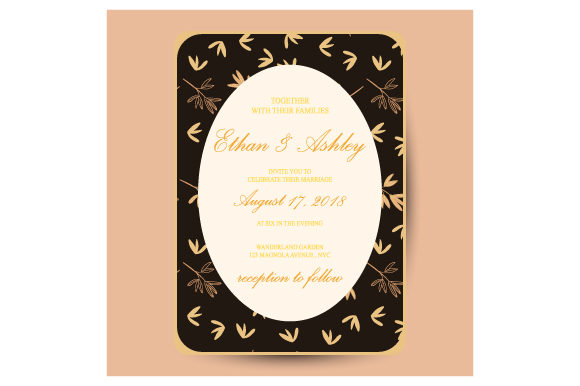
Wedding Invitation Floral Pattern: Design Versatility and File Essentials
Selecting the perfect visual identity for a wedding often begins with a single, defining element. For many couples and designers, that element is a wedding invitation floral pattern. This design choice transcends mere decoration; it sets the emotional tone, hints at the season, and establishes the formality of the event before a guest even reads the text. Whether you are a professional stationer looking to expand your template library or a DIY bride crafting your own suite, understanding the technical and aesthetic nuances of these patterns is essential for a polished result.
Beyond the artwork itself, the utility of a digital asset lies in its format. A high-quality resource typically includes both a vector EPS and a JPG file. This combination ensures that the design remains crisp on a 5x7 cardstock while also being easily previewable on a screen. When utilizing a wedding invitation with floral pattern frame, knowing how to leverage these specific file types can mean the difference between a pixelated print and a professional-grade keepsake.
The Role of Botanical Frames in Wedding Stationery
A floral frame serves a distinct functional purpose in typography-heavy designs. Unlike a full-bleed background pattern which can sometimes compete with legibility, a frame creates a dedicated negative space for crucial information. This structured approach guides the reader’s eye naturally toward the center of the card where names, dates, and venues reside.
When evaluating a wedding invitation floral pattern for framing purposes, consider the density of the botanical elements. A successful frame balances visual interest with whitespace. If the illustration is too dense, adding custom text becomes difficult without extensive editing. Conversely, if the frame is too sparse, it may look unfinished once printed. The ideal asset provides a harmonious border that enhances the hierarchy of information rather than obscuring it.
Understanding Vector EPS vs. Raster JPG
One of the most critical aspects of working with digital wedding assets is understanding the difference between the included file formats. Both serve unique roles in the production workflow.
- Vector EPS (Encapsulated PostScript): This is the master file for print production. Vectors are composed of mathematical paths rather than pixels. This means you can scale a wedding invitation with floral pattern frame to the size of a billboard or shrink it to a postage stamp without any loss of quality. For professionals, the EPS allows for color separation, individual element manipulation, and seamless integration into layout software like Adobe Illustrator or Affinity Designer.
- JPG (Joint Photographic Experts Group): This raster format is best suited for digital proofs, web previews, and quick mockups. While excellent for sharing concepts with clients or viewing on mobile devices, JPGs have a fixed resolution. Enlarging them beyond their native dimensions results in pixelation. Use this file for inspiration boards or digital-only invitations, but always revert to the EPS for physical printing.
Practical Applications Across Wedding Elements
The versatility of a well-crafted floral pattern extends far beyond the primary invitation card. Consistency is key to a cohesive wedding brand, and having access to scalable vector files allows creators to adapt the motif across various touchpoints.
Stationery Suite Cohesion
A common challenge in DIY design is making disparate elements look like they belong together. By using the same wedding invitation floral pattern as a foundational layer, you can unify the entire suite. Consider these applications:
- Save-the-Dates: Use a cropped section of the frame to create a minimalist teaser.
- RSVP Cards: Utilize a smaller, simplified version of the botanical border to maintain recognition without overwhelming limited space.
- Envelope Liners: Scale the EPS file to create a repeating pattern that lines the interior of the envelope, adding a luxurious surprise upon opening.
- Thank You Notes: Repurpose the original frame with updated text to close the loop on the stationery experience.
Digital and Environmental Integration
Modern weddings often blend physical and digital experiences. The JPG file included with your asset is particularly useful here. It can be embedded directly into wedding websites as header art or used as a background for digital RSVP forms. Furthermore, the vector EPS can be sent to vendors for environmental signage. Imagine the same delicate peony or eucalyptus frame appearing on acrylic welcome signs, seating charts, or menu cards at the reception. This cross-medium consistency elevates the perceived value of the event design.
Evaluating Suitability for Your Project
Not every floral pattern suits every wedding. Before downloading or purchasing an asset, assess its alignment with your specific needs through a practical lens.
Seasonal and Thematic Alignment
Botanical illustrations carry inherent seasonal cues. Peonies and roses suggest spring or early summer, while dahlias and protea imply autumn. Wildflowers evoke rustic outdoor ceremonies, whereas structured magnolias or orchids lean toward formal indoor affairs. Ensure the wedding invitation floral pattern matches not just the color palette, but the actual season and venue style. A mismatch here can create cognitive dissonance for guests receiving the invitation months before the event.
Technical Compatibility Check
Before committing to a design, verify your software capabilities. Opening and editing an EPS file requires vector-based software. If you only have access to basic photo editors or word processors, you may be limited to using the JPG. In such cases, ensure the JPG resolution is at least 300 DPI at your intended print size. If you plan to hire a designer later, providing them with the original EPS will save time and money, as they won't need to recreate the artwork from scratch.
Customization and Personalization Strategies
While pre-made templates offer convenience, personalization makes them unique. The inclusion of a vector EPS empowers users to modify the base design significantly.
- Color Adaptation: Change the hue of leaves or blooms to match specific bridesmaid dresses or venue accents. Vectors allow for global color changes in seconds.
- Element Rearrangement: Move individual stems or flowers to accommodate longer names or additional lines of text. This flexibility is impossible with a flattened JPG.
- Opacity Adjustments: Create a watermark effect by reducing the opacity of the floral frame. This allows for text placement over the artwork without sacrificing readability.
- Mixing Motifs: Combine elements from different vector files to create a bespoke botanical blend that exists nowhere else.
Common Pitfalls and How to Avoid Them
Even with high-quality assets, execution errors can occur. Being aware of common limitations helps prevent disappointment.
Resolution Misconceptions
A frequent mistake is assuming all digital files are print-ready. Always check the dimensions of the JPG. If it is optimized for web use (72 DPI), it will appear blurry when printed. Reserve the JPG strictly for screens unless verified as high-resolution. For any physical output, the EPS is non-negotiable for professional results.
Overcrowding the Text Area
It is tempting to maximize the decorative elements, but legibility must remain paramount. When placing text within a wedding invitation with floral pattern frame, maintain adequate padding between the type and the illustration. Test print at actual size before finalizing. What looks spacious on a 27-inch monitor may feel claustrophobic on a 5x7 card held in hand.
Ignoring Paper Texture
Digital designs interact differently with various paper stocks. Intricate floral details might get lost on textured linen or cotton paper. Conversely, smooth cardstock renders fine lines beautifully. Request a test print on your chosen paper stock to see how the ink lays down. You may need to adjust the stroke weight of the vector lines or increase contrast to compensate for paper absorption.
Making the Final Decision
Ultimately, the right wedding invitation floral pattern bridges the gap between artistic vision and practical communication. It should resonate emotionally while functioning flawlessly technically. By prioritizing assets that include both vector EPS and JPG formats, you future-proof your design against scaling issues and format incompatibilities.
Whether you are designing for yourself or a client, approach the selection process with intention. Look beyond the pretty picture to evaluate the structure, editability, and versatility of the file. A well-chosen floral frame does more than decorate; it organizes, communicates, and endures as a tangible memory of a significant celebration. Invest time in understanding the tools at your disposal, and the resulting stationery will reflect both beauty and craftsmanship.