Integrating the Dahlia Sketch Floral Wedding Menu Card into Modern Event Design
The intersection of botanical illustration and minimalist typography has defined contemporary wedding stationery for several years, moving away from heavy ornamentation toward cleaner, more intentional aesthetics. Within this design movement, the Dahlia Sketch Floral Wedding Menu Card serves as a prime example of how specific floral motifs can anchor an entire visual identity without overwhelming the functional purpose of the document. For event professionals, designers, and couples navigating the vast landscape of digital assets, understanding the technical and aesthetic nuances of this specific template is essential for creating cohesive dining experiences. The dahlia, with its intricate petal structure and geometric symmetry, offers a unique visual texture that translates exceptionally well to line art and sketch styles, making it a versatile choice for modern celebrations ranging from intimate garden gatherings to formal ballroom receptions.
Aesthetic Versatility and Visual Hierarchy
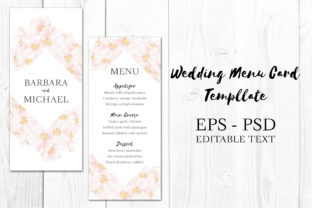
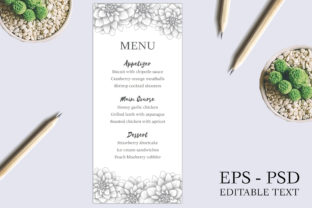
The primary advantage of utilizing a sketch-style dahlia decoration lies in its ability to maintain visual interest while preserving negative space. Unlike watercolor florals that can sometimes bleed into text areas or create contrast issues, a linear sketch provides a crisp boundary between art and information. This characteristic is particularly valuable for menu cards where readability is paramount. The 4 x 9 inch dimension of this template creates a slender, elegant silhouette that fits comfortably within standard place settings without dominating the table scape. This vertical aspect ratio encourages a top-down reading flow that aligns naturally with the listing of courses, from appetizers through desserts.
From a design theory perspective, the dahlia sketch acts as a directional cue. When positioned at the top or bottom corners of the card, the organic curves of the flower guide the guest’s eye toward the center content. This subtle manipulation of visual hierarchy ensures that the culinary offerings remain the focal point. For designers working with this asset, the monochromatic nature of a sketch allows for effortless color adaptation. Whether the wedding palette involves dusty blues, terracotta, sage green, or classic black and white, the line art can be recolored within the editable files to match fabric swatches and floral arrangements precisely. This adaptability makes the Dahlia Sketch Floral Wedding Menu Card a foundational element rather than a restrictive decorative afterthought.
Technical Specifications and File Management
For professionals and hobbyists alike, the utility of a digital template is dictated by its file architecture and compatibility. This resource is provided in two distinct industry-standard formats: EPS CS6 and PSD CS6. Understanding the distinction between these file types is critical for efficient workflow integration.
- EPS CS6 Editable File: Encapsulated PostScript files are vector-based, meaning the dahlia sketch is composed of mathematical paths rather than pixels. This format is ideal for designers who need to scale the floral element significantly without losing quality. If you are adapting the 4 x 9 inch menu design for larger signage, such as a welcome board or bar menu, the EPS file ensures the lines remain razor-sharp. Adobe Illustrator CS6 or newer versions are required to manipulate the anchor points, stroke weights, and colors of the vector art.
- PSD CS6 Editable File: Photoshop Document files offer a layer-based raster environment. This format is generally preferred for users who want to focus on text layout and color grading rather than vector manipulation. The PSD version typically includes organized layers for the background, the floral artwork, and separate text groups. Because it is compatible with CS6 and later, it accommodates a wide range of software versions, reducing friction for those who may not have upgraded to the latest Creative Cloud subscription.
The inclusion of both formats addresses the diverse needs of the target audience. A professional stationer might use the EPS to customize the flower's density or create matching assets, while a DIY bride or junior designer might prefer the PSD for straightforward text replacement and printing preparation. Both files support 100% editable text, ensuring that no content is rasterized or locked, which is a common pain point with lower-quality templates.
Typography Pairing and Content Layout
Selecting the appropriate typeface is as important as the floral illustration itself when working with the Dahlia Sketch Floral Wedding Menu Card. The sketch style possesses a hand-drawn, artisanal quality that pairs best with fonts that share similar humanist characteristics or provide deliberate contrast. Serif typefaces with high stroke contrast, such as Baskerville or Playfair Display, complement the delicate lines of the dahlia petals, reinforcing a sense of traditional elegance updated for modern sensibilities. Conversely, a clean sans-serif like Montserrat or Lato can create a striking juxtaposition, emphasizing the "modern" aspect of the stationery suite.
When editing the text within the 4 x 9 inch canvas, spacing requires careful attention. The narrow width means that long dish descriptions may need to be condensed or broken across multiple lines. Best practices suggest keeping course titles bold and distinct from descriptions to aid quick scanning. Since the template is fully editable, users should utilize paragraph styles and character panels to maintain consistent leading and kerning throughout the menu. Automated text boxes in the PSD or EPS files facilitate this consistency, but manual adjustment is often necessary to accommodate varying word counts in different languages or dietary explanations.
Practical Applications Beyond the Reception Dinner
While designated as a menu card, the structural and aesthetic properties of this template lend themselves to various secondary applications within the event ecosystem. The dahlia sketch motif creates brand continuity when applied across different touchpoints. Event planners and designers can repurpose the 4 x 9 inch layout for:
- Order of Service Programs: For ceremonies that require a printed guide, the vertical format accommodates hymn lyrics, readings, and participant lists effectively. The dahlia sketch adds a reverent yet celebratory tone appropriate for both religious and secular ceremonies.
- Cocktail Hour Signage: Scaled up proportionally, the design works beautifully for bar menus or signature drink lists. The sketch style remains legible at larger sizes, and the vertical orientation suits easel displays and acrylic stands.
- Vendor Thank You Cards: Post-wedding etiquette often involves sending notes to service providers. Repurposing the menu card template as a tall thank-you note maintains the wedding's visual branding while providing ample space for personalized messages.
- Hotel Welcome Letters: For destination weddings, this template can serve as an itinerary or welcome letter placed in guest hotel rooms. The familiar floral motif reinforces the event theme before guests even arrive at the venue.
This multiplicity of use cases maximizes the return on investment for the digital asset. Rather than purchasing separate templates for each stationery item, creators can derive an entire suite from the single Dahlia Sketch Floral Wedding Menu Card file, ensuring perfect stylistic alignment across all printed materials.
Print Production Considerations
Digital perfection must translate to physical reality, and the choice of paper stock significantly influences the final perception of sketch-based stationery. Line art relies heavily on contrast; therefore, paper brightness and texture play pivotal roles. Uncoated stocks, such as cotton rag or linen, enhance the hand-drawn feel of the dahlia sketch by allowing ink to absorb slightly into the fiber, mimicking the look of pencil or charcoal on paper. Coated or glossy papers, while vibrant, can sometimes make sketch lines appear too clinical or digital.
Color accuracy is another critical consideration when preparing the editable files for print. While the screen display uses RGB color space, professional printing requires CMYK conversion. Users working in the PSD or EPS environments should convert their color profiles prior to finalizing the design to avoid unexpected shifts in hue, particularly if the dahlia sketch has been customized with colored strokes. Additionally, because the template is sized at exactly 4 x 9 inches, designers must account for bleed if the floral elements extend to the edge of the card. Extending the artwork 0.125 inches beyond the trim line prevents white borders from appearing after cutting. For those printing at home, verifying printer margin limitations is essential, as many consumer printers cannot print borderless on 4 x 9 inch media.
Customization Workflows for Non-Designers
The accessibility of this template extends to users without extensive graphic design training. The "100% editable text" feature implies that smart objects or text layers are clearly labeled. When opening the PSD file, users should look for layer groups named "Text," "Editable Content," or similar descriptors. Double-clicking the text layer icon activates the type tool, allowing for immediate changes. It is advisable to keep the original file intact and save a working copy to preserve the master template.
For those utilizing the EPS file without advanced vector skills, basic modifications can still be achieved. Changing the global color swatch in Adobe Illustrator will update the dahlia sketch color instantly across the entire artboard. Text editing in EPS follows similar principles to PSD, though font management is stricter; missing fonts will trigger substitution warnings. Ensuring that chosen fonts are either installed on the system or outlined (if no further text edits are needed) prevents formatting errors during export. Exporting the final design as a high-resolution PDF (300 DPI minimum) is the universal standard for submitting wedding stationery to professional printers, ensuring that the delicate lines of the dahlia sketch reproduce with the clarity and refinement intended by the original design.