Integrating the Floral Guinea Fowl Silhouette Vector into Creative and Commercial Workflows
The Floral Guinea Fowl Silhouette Vector serves as a foundational asset for designers, crafters, and small business owners who require versatile, high-quality graphics. Unlike standard raster images that lose quality when resized, this specific collection provides a comprehensive suite of file formats designed to bridge the gap between digital design and physical production. Whether you are developing branding materials for an agricultural business, designing nursery decor, or creating print-on-demand merchandise, understanding how to leverage these specific files ensures efficiency and professional results throughout your project lifecycle.
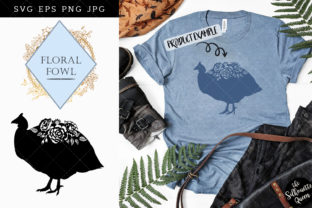
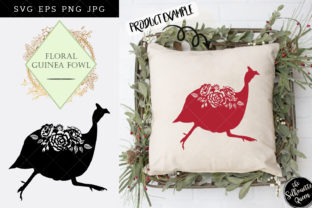
This asset package is not merely a single image; it is a multi-format toolkit. It includes one PNG file with a transparent background at 300dpi, one JPG file with a white background at 300dpi, one SVG file, and one EPS file. Each iteration features a black silhouette, specifically optimized for easy recoloring and manipulation in industry-standard software. This deliberate simplicity allows the graphic to function as a chameleon within your workflow, adapting to everything from intricate wedding invitations to large-scale wall art without requiring complex redrawing or tracing.
Technical Specifications and File Management
Before integrating the Floral Guinea Fowl Silhouette Vector into a live project, it is essential to understand the technical parameters of each included file. Proper file selection prevents downstream issues such as pixelation, unwanted backgrounds, or compatibility errors with cutting machines or print vendors.
- PNG (Transparent Background): At 300dpi and approximately 10 inches at its widest point, this file is the workhorse for digital compositing. The transparency allows for immediate layering over textured papers, colored backgrounds, or photographic elements without manual masking. The 10-inch dimension ensures sufficient resolution for most standard print applications while keeping file sizes manageable for web-based proofing tools.
- JPG (White Background): Also at 300dpi and 10 inches wide, this format is optimized for compatibility. Many legacy systems, basic office software, and certain print-on-demand portals do not support transparency or vector formats. This file serves as a universal fallback for quick mockups, client approvals, or platforms that strictly require raster inputs with solid backgrounds.
- SVG (Scalable Vector Graphics): This is the primary file for infinite scaling and digital editing. Because it is code-based, you can resize the Floral Guinea Fowl Silhouette Vector to fit a business card or a billboard without any loss of fidelity. It is also the preferred format for consumer-grade cutting machines like Cricut and Silhouette, as well as professional laser engravers.
- EPS (Encapsulated PostScript): Designed for professional print environments and advanced vector software like Adobe Illustrator or CorelDRAW. The EPS file retains all curve data and is often required by commercial screen printers, sign makers, and embroidery digitizers who need to manipulate anchor points directly.
Organizing these assets immediately upon download is a critical step in workflow efficiency. Create a dedicated folder structure labeled by project type or asset category. Renaming files to include descriptors—such as "GuineaFowl_Floral_SVG_Black" rather than generic filenames—saves significant time when searching through asset libraries months later. For teams using cloud storage, maintaining this naming convention ensures consistency across shared drives.
Pre-Production: Recoloring and Customization
The fact that each image is a black silhouette is a strategic feature, not a limitation. Black vectors act as neutral bases that integrate seamlessly into established brand color palettes. Before beginning layout work, open the SVG or EPS file in your preferred vector editor to adjust the fill color. This should be done as a pre-production step to maintain non-destructive editing practices.
For logo design and branding projects, match the silhouette’s fill to your primary or secondary brand colors. If the Floral Guinea Fowl Silhouette Vector is being used for a farm-to-table restaurant logo, you might apply a deep forest green or earthy terracotta. For nursery art or wedding stationery, softer pastels or metallic gradients may be more appropriate. By handling color correction before placing the asset into layout software like InDesign or Canva, you ensure color consistency across all deliverables.
Educators and content creators can utilize this recoloring capability to create thematic variations from a single source file. A biology teacher creating resources on poultry breeds could use different colors to distinguish between species or anatomical diagrams, while a blogger might adjust the hue to match seasonal website themes. This maximizes the return on investment for the asset by allowing one purchase to serve multiple distinct visual needs.
Execution Across Digital and Physical Mediums
The versatility of the Floral Guinea Fowl Silhouette Vector becomes apparent during the execution phase. Its application spans digital interfaces, paper goods, textiles, and rigid substrates. Understanding which file format suits each medium streamlines production and reduces error rates.
Print and Stationery Applications
For wedding invitations, greeting cards, and custom stationery, the 300dpi PNG is often the most practical choice for designers working in raster-heavy environments like Photoshop or Procreate. The transparent background allows the guinea fowl to interact organically with floral watercolors or typographic elements. However, if you are sending files to a professional offset printer or letterpress studio, they will likely request the EPS or SVG to ensure crisp edges at any size. Always confirm vendor specifications before finalizing files.
In scrapbooking and journaling, the 10-inch width provides ample coverage for standard 12x12 layouts while remaining detailed enough for smaller cardstock accents. The black silhouette creates strong contrast against patterned papers, serving as an effective focal point or framing device for photographs.
Fabric and Apparel Production
Print-on-demand fabric and t-shirt design require careful attention to resolution and color separation. For direct-to-garment (DTG) printing, the high-resolution PNG is suitable, but ensure the transparent areas are truly transparent and not white-filled, unless a white underbase is desired. For screen printing, the EPS file is superior because it allows the printer to create clean film positives and separate colors easily. The simple silhouette nature of this design makes it particularly cost-effective for screen printing, as it typically requires only a single ink pass.
When designing for fabric yardage, the SVG format allows you to create seamless patterns or scalable placements without worrying about pixel boundaries. You can tile the Floral Guinea Fowl Silhouette Vector across a bolt of fabric for upholstery or quilting projects, adjusting the scale dynamically to suit the textile weight and intended use.
Digital and Web Implementation
Web designers should prioritize the SVG format for site integration. SVGs render sharply on Retina displays and high-DPI monitors, unlike raster alternatives that can appear blurry. Furthermore, SVGs are lightweight and can be styled with CSS, allowing for hover effects or animation directly in the browser. When using the graphic for blog headers or social media templates, the PNG offers a quick drag-and-drop solution for platforms that do not yet support native SVG uploads.
Post-Production and Long-Term Asset Utility
The value of the Floral Guinea Fowl Silhouette Vector extends beyond individual projects. As a reusable asset, it supports long-term creative strategies and business continuity. Maintaining a master library of unaltered source files ensures you always have a clean starting point for future iterations.
Quality control is paramount after production. When reviewing printed proofs or digital mockups, check the edges of the silhouette for jaggedness or halo effects. These artifacts usually indicate that a low-resolution raster was used instead of the vector source, or that transparency was flattened incorrectly. Establishing a checklist for asset verification helps maintain professional standards across all outputs.
For entrepreneurs and marketers, this asset supports cohesive visual storytelling. Using the same silhouette across packaging, web presence, and promotional merchandise builds brand recognition. The floral integration within the guinea fowl shape adds a layer of aesthetic sophistication that distinguishes it from generic livestock clip art, making it suitable for boutique brands targeting niche audiences interested in homesteading, cottagecore aesthetics, or artisanal agriculture.
Educators and teaching resource creators can archive modified versions of the vector for curriculum reuse. A diagram created for a current semester can be recolored or rescaled for future materials without repurchasing or redrawing. This efficiency aligns with productivity-minded workflows where asset creation is treated as an investment in future output capacity.
Ultimately, the Floral Guinea Fowl Silhouette Vector is a tool designed for flexibility. Its inclusion of four distinct file types acknowledges the fragmented nature of modern creative work, where professionals and hobbyists alike must navigate multiple software ecosystems and output requirements. By selecting the correct format for the task, preparing files with intention, and maintaining organized archives, users can extract maximum utility from this resource. Whether producing a single wedding invitation or launching a full product line, the technical foundation provided by this vector set supports both creative vision and operational excellence.